

ઍપ ઇન્સ્ટોલ કરોInstall the app
થોડા ટૅપમાં આ વેબસાઇટને ઍપની જેમ તમારા ફોનમાં રાખો.Keep this website on your phone like an app, in a few taps.
Android પર, Chrome માંOn Android, in Chrome
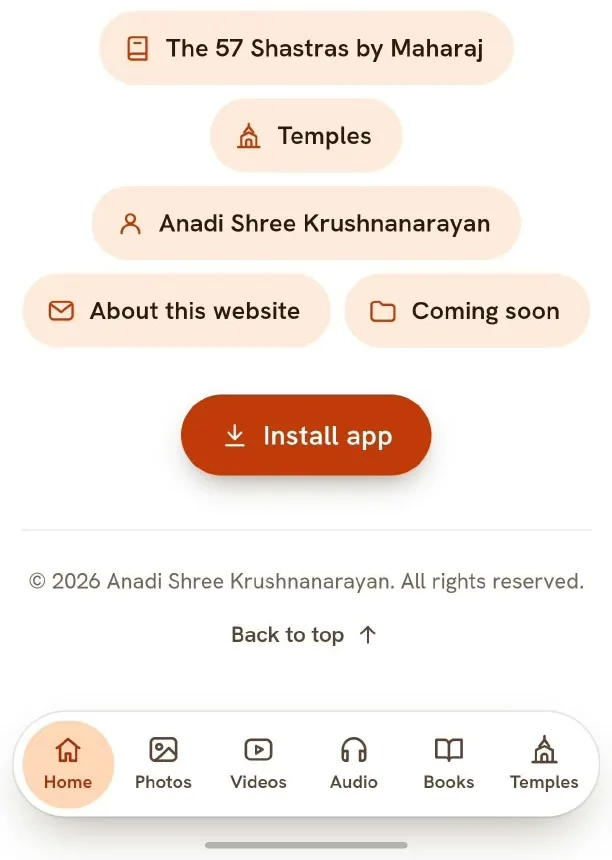
- Install app બટન દબાવોTap the Install app buttonતે દરેક પેજની નીચે છે. તમે અહીં પણ દબાવી શકો છો.It is at the bottom of every page. You can also tap it here.
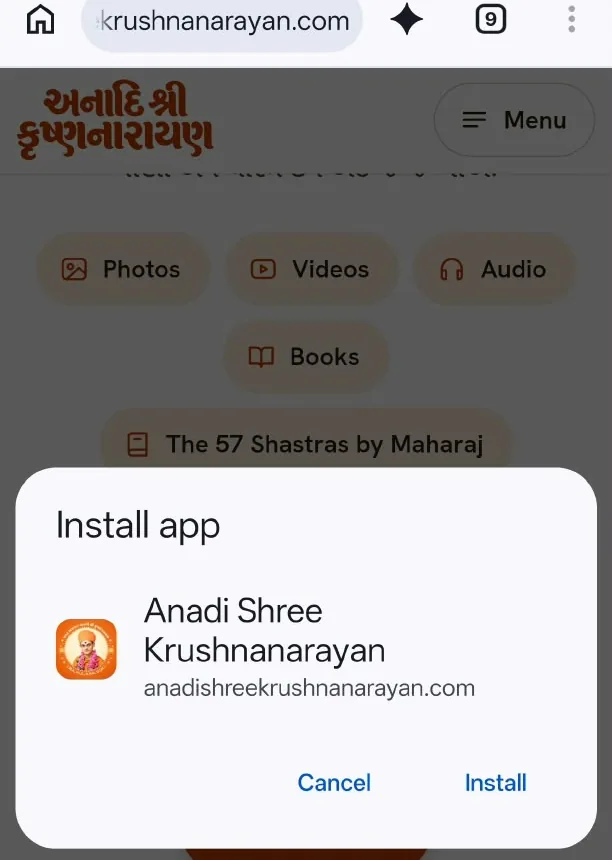
- Install દબાવોTap Installઍપના નામ સાથે એક નાનું બૉક્સ ખૂલશે. જમણી બાજુ Install દબાવો.A small box opens with the app name. Tap Install on the right.
- હોમ સ્ક્રીન પરથી ખોલોOpen it from your home screenમહારાજના ફોટાવાળું કેસરી આઇકન શોધો. તેની નીચે નામ નથી હોતું. તેને દબાવતાં ઍપ ખૂલશે.Look for the saffron icon with Maharaj's photo. It has no name under it. Tap it and the app opens.

Install app બટન કે નાનું બૉક્સ દેખાતું નથી?No Install app button or small box?
Chrome મેનુ વાપરોUse the Chrome menuસરનામાની બાજુનાં ત્રણ ટપકાં દબાવો, પછી આ શબ્દો અનુસરો. Create shortcut નહીં, Install પસંદ કરો.Tap the three dots next to the address bar, then follow these words. Choose Install, not Create shortcut.Install and create shortcutInstall
Chrome વાપરો, અને જુઓ કે ઍપ પહેલેથી ઇન્સ્ટોલ નથી નેUse Chrome, and check it is not already installedઆ વેબસાઇટ Chrome માં ખોલો. ઍપ ફોનમાં પહેલેથી હોય તો બૉક્સ ફરી નહીં ખૂલે.Open this website in Chrome. If the app is already on your phone, the box will not open again.
iPhone પર, Safari માંOn iPhone, in Safari
- આ વેબસાઇટ Safari માં ખોલોOpen this website in Safari
- Share સૂચિ ખોલોOpen the Share listSafari ના ટૂલબારમાં મેનુ બટન દબાવો, પછી Share દબાવો. ટૅબ ઉપર કે નીચે હોય તો સીધું Share બટન દબાવો.Tap the menu button in Safari's toolbar, then tap Share. If your tabs are at the top or bottom, tap the Share button instead.
- Add to Home Screen દબાવોTap Add to Home Screenસૂચિ નીચે સરકાવો. More દેખાય તો પહેલાં તે દબાવો.Scroll down the list. If you see More, tap it first.
- Open as Web App ચાલુ કરો, પછી Add દબાવોTurn on Open as Web App, then tap AddOpen as Web AppAdd
- હોમ સ્ક્રીન પરથી ખોલોOpen it from your home screenમહારાજના ફોટાવાળું કેસરી આઇકન શોધો. તેની નીચે નામ નથી હોતું. તેને દબાવતાં ઍપ ખૂલશે.Look for the saffron icon with Maharaj's photo. It has no name under it. Tap it and the app opens.
સૂચિમાં Add to Home Screen નથી?No Add to Home Screen in the list?
તેને સૂચિમાં ઉમેરોAdd it to the listસૂચિના અંત સુધી જાઓ, Edit Actions દબાવો, પછી Add to Home Screen દબાવો.Scroll to the bottom of the list, tap Edit Actions, then tap Add to Home Screen.Edit ActionsAdd to Home Screen
આ ઉપકરણ માટેનાં ચિત્રો ટૂંક સમયમાં આવશે.Pictures for this device are coming soon.
Windows પર, Chrome માંOn Windows, in Chrome
- Install app બટન દબાવોClick the Install app buttonતે દરેક પેજની નીચે છે. તમે અહીં પણ દબાવી શકો છો.It is at the bottom of every page. You can also click it here.
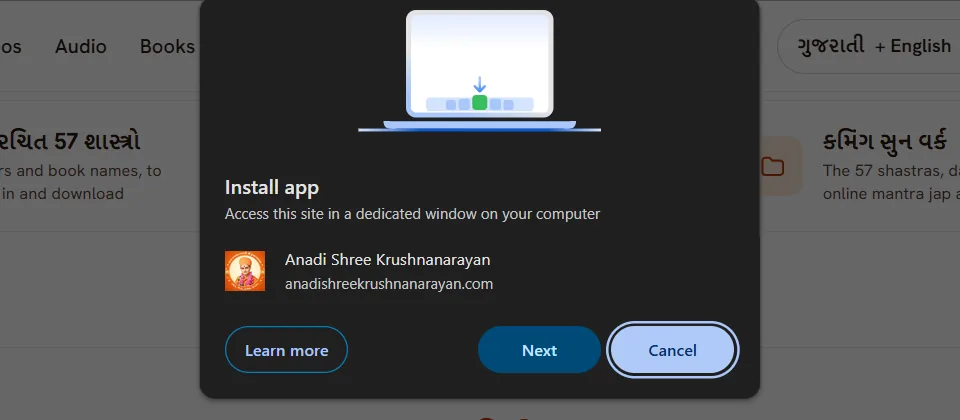
- Next દબાવોClick Next
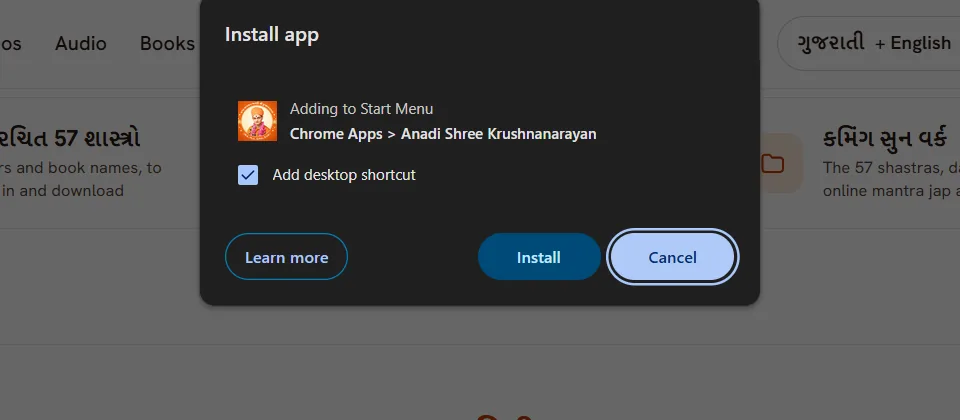
- Install દબાવોClick InstallAdd desktop shortcut પર ટિક રહેવા દો, જેથી ઍપ ડેસ્કટૉપ પર પણ રહે.Keep Add desktop shortcut ticked, so the app is also on your desktop.
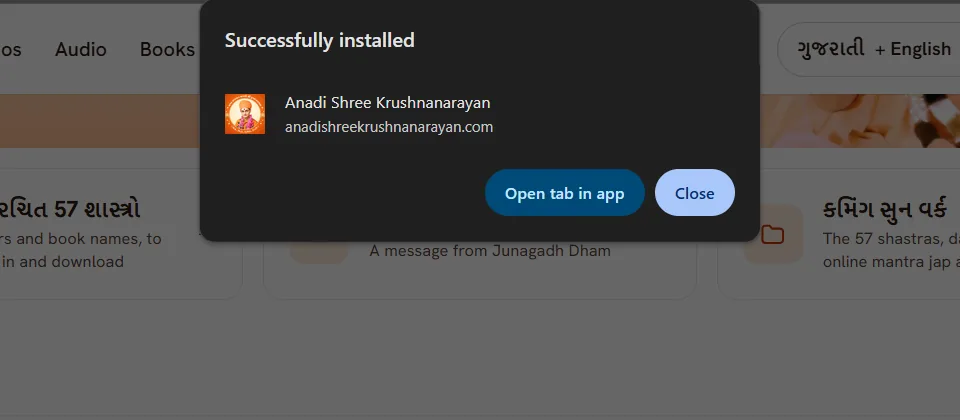
- Open tab in app દબાવોClick Open tab in appહવે પછી તેને Start Menu કે ડેસ્કટૉપ પરથી ખોલો.Next time, open it from the Start Menu or your desktop.
બટન નથી, કે Microsoft Edge વાપરો છો?No button, or using Microsoft Edge?
Chrome માં મેનુ વાપરોIn Chrome, use the menuઉપર જમણી બાજુનાં ત્રણ ટપકાં દબાવો, પછી આ શબ્દો અનુસરો.Click the three dots at the top right, then follow these words.Cast, save, and shareInstall page as app
Microsoft Edge માંIn Microsoft Edgeસરનામા પટ્ટીમાં App available આઇકન દબાવો, પછી Install દબાવો.Click the App available icon in the address bar, then click Install.App availableInstall
Mac પર, Safari માંOn Mac, in Safari
- આ વેબસાઇટ Safari માં ખોલોOpen this website in Safari
- Share દબાવો, પછી Add to DockClick Share, then Add to DockShare બટન ટૂલબારમાં છે.The Share button is in the toolbar.ShareAdd to Dock
- Add દબાવોClick Add
- Dock માંથી ખોલોOpen it from the DockDock માં મહારાજના ફોટાવાળું કેસરી આઇકન શોધો.Look for the saffron icon with Maharaj's photo in the Dock.
Mac પર Chrome વાપરો છો?Using Chrome on Mac?
Chrome મેનુ વાપરોUse the Chrome menuઉપર જમણી બાજુનાં ત્રણ ટપકાં દબાવો, પછી આ શબ્દો અનુસરો.Click the three dots at the top right, then follow these words.Cast, save, and shareInstall page as app
આ ઉપકરણ માટેનાં ચિત્રો ટૂંક સમયમાં આવશે.Pictures for this device are coming soon.
ઇન્સ્ટોલ થયા પછીOnce it is installed
- એક ટૅપમાં ખૂલેOne tap to openવેબસાઇટ ફરી શોધવાની જરૂર નથી.No need to search for the website again.
- ઍપ જેવો અનુભવFeels like an appતે બ્રાઉઝર વિના, સ્વતંત્ર રીતે ખૂલે છે.It opens on its own, without the browser around it.
- નિઃશુલ્કFreePlay Store કે એકાઉન્ટની જરૂર નથી.No Play Store and no account needed.